

The ‘Facebook Marketplace’ Tech Guide: 5 Red Flags to Watch for When Buying Used Gear
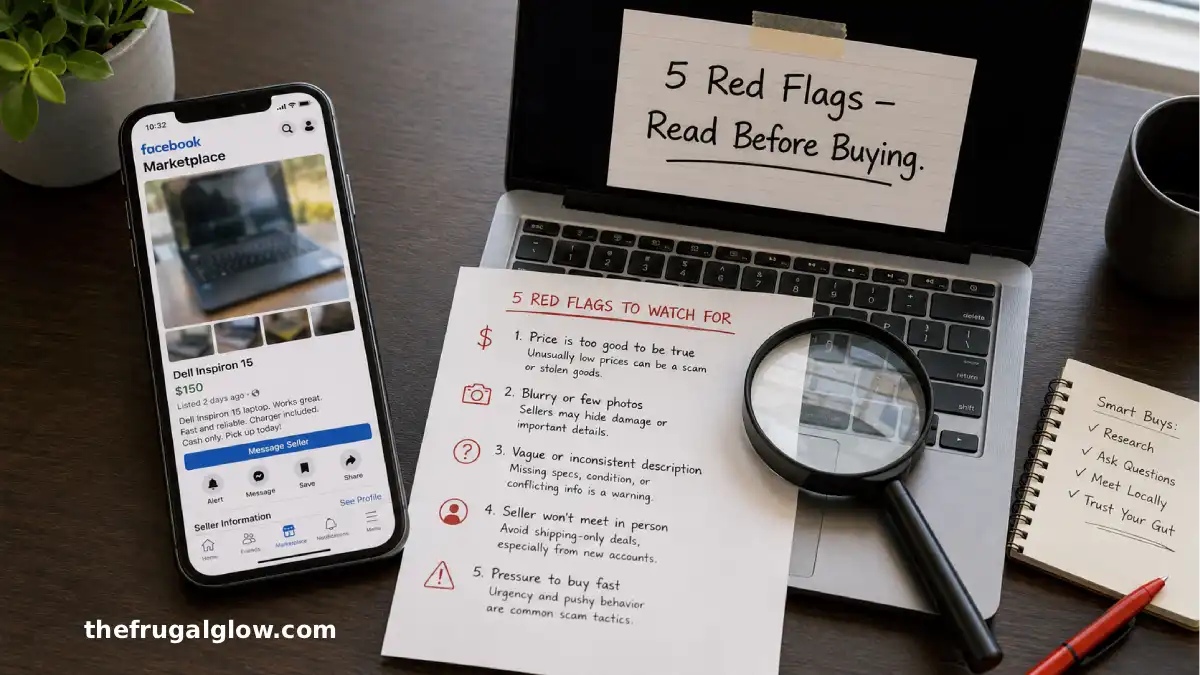
Let me tell you about the $150 laptop that cost me $600.
I found it on Facebook Marketplace. The listing said “like new, barely used.” The price was $150. The same laptop retailed for $500. I thought I was being smart. I met the seller at a coffee shop. The laptop turned on. The screen looked fine. I handed over the cash and went home.
Two days later, the laptop wouldn’t charge. I bought a new charger. That didn’t fix it. I took it to a repair shop. They opened it up and found water damage. Corroded motherboard. Fried battery. The repair cost was more than the laptop was worth.
I had bought a drowned laptop from a seller who knew exactly what they were doing. They’d dried it out just enough to boot up for five minutes. Long enough for me to hand over cash. Short enough that the corrosion hadn’t killed it yet.
That was my $450 mistake.
I’ve bought and sold dozens of tech items on Facebook Marketplace since then. Phones, laptops, monitors, keyboards, headphones, gaming consoles. I’ve been scammed. I’ve almost been scammed. And I’ve learned to spot a bad deal from a thousand miles away.
Today, I’m sharing the five biggest red flags I’ve learned to watch for. These are the signs that a listing is hiding something. The seller is lying. The gear is broken, stolen, or not what it seems.
If you’re shopping for used tech on Facebook Marketplace, read this first. It’ll save you money, time, and the humiliation of handing cash to a scammer.
Let’s get into it.
Jump Links
- The $150 Laptop That Cost Me $600 (My Scam Story)
- Red Flag #1: The ‘Too Good to Be True’ Price
- Red Flag #2: Seller Won’t Meet in a Safe, Public Place
- Red Flag #3: The ‘I’ll Ship It’ Request (Scam Central)
- Red Flag #4: Vague Photos or Stock Images Only
- Red Flag #5: The ‘No Returns, As Is’ Pressure Tactic
- Bonus Red Flags: What Else to Watch For
- How to Safely Buy Used Tech (Your Pre-Meeting Checklist)
- What to Do If You’ve Already Been Scammed
- Frequently Asked Questions (FAQ)
- Final Thoughts: Used Tech Can Save You Thousands – If You’re Smart
The $150 Laptop That Cost Me $600 (My Scam Story)
I need to tell you the full story of my $150 laptop mistake. Not because I’m proud of it. Because I want you to see how easy it is to get scammed, even when you think you’re being careful.
The listing was perfect. A 2021 Dell laptop, good specs, “barely used, like new, just upgraded to a MacBook.” The photos showed a clean laptop on a white desk. The price was $150. The same model sold for $450-500 on eBay.
I messaged the seller. They responded within minutes. Friendly, chatty, seemed normal. We agreed to meet at a Starbucks near my house.
At the coffee shop, the seller arrived on time. They had the laptop in a padded sleeve. They turned it on. The screen lit up. Windows loaded. I clicked around for a few minutes. Everything seemed fine.
I asked if there were any issues. “Nope, works perfectly,” they said. “I just don’t need it anymore.”
I handed over $150 in cash. They handed over the laptop. We shook hands. I went home feeling like I’d just won the lottery.
Two days later, the laptop wouldn’t charge. I tried three different chargers. Nothing. I took it to a repair shop. The technician opened it up and showed me the motherboard. Green and white corrosion everywhere. Someone had spilled liquid inside, dried it out just enough to boot, and sold it before the corrosion killed it.
The repair estimate was $350. Plus the $150 I’d already spent. That’s $500 for a laptop worth $200 in working condition.
I messaged the seller. No response. Their Facebook profile was gone. They’d used a fake name and a burner account.
That was the day I learned that Facebook Marketplace is not Amazon. There are no returns. There is no customer service. There is only you, your cash, and a stranger who may or may not be honest.
I’ve bought plenty of great tech on Marketplace since then. But I’ve also learned to spot the red flags. Here are the five most important ones.
Red Flag #1: The ‘Too Good to Be True’ Price
If a deal seems too good to be true, it almost always is.
What it looks like:
- A $500 laptop listed for $150
- A $1,000 iPhone listed for $300
- A $400 gaming console listed for $100
Why it’s a red flag:
Legitimate sellers do research. They look at eBay sold listings, Facebook Marketplace comps, and similar items. They price their gear competitively, not insanely low.
Scammers use low prices to get your attention and rush your decision. They want you to think “I need to grab this before someone else does.”
How to check:
- Search for the same item on eBay. Filter by “sold items.” See what real people actually paid.
- Search Facebook Marketplace for the same item in your area. If everyone else is selling for $400 and this one is $150, something is wrong.
- Ask yourself: why would someone sell a $500 item for $150? The only plausible answers are “it’s stolen” or “it’s broken.”
What a good deal looks like:
A good deal is 30-50% off retail, not 70-80% off. A $500 laptop in good condition should sell for $250-350, not $150. A $1,000 phone should sell for $500-700, not $300.
If the price is less than half of what everyone else is charging, walk away.
Red Flag #2: Seller Won’t Meet in a Safe, Public Place
This is non-negotiable. Safe. Public. Well-lit. During daylight hours.
What it looks like:
- “Can you meet me at my apartment?”
- “I’m at work, can you come here?”
- “My car is broken, can you come to my house?”
- “Let’s meet at this park after dark.”
Why it’s a red flag:
Legitimate sellers want to meet in public. They want you to feel safe. They want witnesses.
Scammers want you in a private place where there are no cameras and no help if something goes wrong.
Where to meet instead:
- Police station parking lot (many stations have designated “safe exchange zones”)
- Bank lobby (cameras everywhere)
- Starbucks or Panera (well-lit, public, cameras)
- Grocery store parking lot (busy, well-lit)
What to do if the seller refuses:
Don’t argue. Don’t negotiate. Just say “I only meet at [safe location]. Let me know if that works for you.” If they say no, block them and move on.
I have never had a legitimate seller refuse to meet at a police station or coffee shop. Only scammers.
Red Flag #3: The ‘I’ll Ship It’ Request (Scam Central)
Facebook Marketplace was designed for local, in-person pickup. The “shipping” option exists, but it’s where most scams happen.
What it looks like:
- “I’m out of town, but I can ship it to you.”
- “I just moved, but I can mail it.”
- “Pay me through Zelle/Venmo/CashApp and I’ll ship it tomorrow.”
Why it’s a red flag:
Once you send money through Zelle, Venmo (friends/family), CashApp, or PayPal Friends & Family, it’s gone. There is no buyer protection. The seller can block you and disappear.
Scammers love these payment methods because they’re irreversible.
The only safe way to pay for shipped items:
- PayPal Goods & Services (not Friends & Family) – you have buyer protection
- Facebook’s own checkout system (not direct payment to the seller)
What to do instead:
If you want an item shipped, buy it on eBay or from a legitimate refurbisher. Facebook Marketplace is not designed for shipped goods. The protections are weak. The scams are rampant.
My rule: I only buy from Facebook Marketplace if I can pick up in person, test the item, and pay with cash. No exceptions.
Red Flag #4: Vague Photos or Stock Images Only
A legitimate seller wants you to see exactly what you’re buying. A scammer wants to hide the damage, scratches, missing parts, or signs of use.
What it looks like:
- Only one or two photos
- Blurry or low-resolution images
- Photos taken from far away
- Stock images from the manufacturer’s website (not real photos of the actual item)
- Photos that don’t show the item turned on
Why it’s a red flag:
If the seller won’t show clear, detailed photos, they’re hiding something. Maybe the screen has a crack. Maybe the keyboard is missing keys. Maybe it’s not even their item to sell.
What to ask for:
- “Can you send a photo of the item turned on?”
- “Can you send a photo of the serial number?”
- “Can you send a photo of any scratches or wear?”
A legitimate seller will send these without hesitation. A scammer will make excuses.
What to look for in photos:
- The item powered on (screen showing something, not just the logo)
- All angles (front, back, sides, top, bottom)
- Close-ups of any damage or wear
- The serial number (so you can check if it’s reported stolen)
If the seller won’t provide these, walk away.
Red Flag #5: The ‘No Returns, As Is’ Pressure Tactic
Every used item on Facebook Marketplace is “as is” by default. There are no returns. That’s the nature of person-to-person sales.
But scammers use this phrase as a pressure tactic. They want you to hand over cash without testing the item.
What it looks like:
- “No returns, so make sure you want it.”
- “As is, no refunds.”
- “I don’t have time to wait while you test it.”
- “It worked yesterday, I don’t know what happened.”
Why it’s a red flag:
A legitimate seller will let you test the item. They have nothing to hide. They want you to feel confident so you’ll buy it.
A scammer will rush you. They’ll pressure you to hand over cash before you can discover the problem.
What to do instead:
Take your time. Test everything. Don’t let the seller rush you.
Your testing checklist:
- Turn it on (phone, laptop, tablet, monitor, console)
- Test every button and port
- Play sound through speakers and headphone jack
- Check the battery (if it’s a laptop or phone, test that it holds a charge)
- Connect to Wi-Fi (if applicable)
- Make a test call (for phones)
If the seller says “no testing” or rushes you, leave. Hand the item back. Say “no thank you” and walk away.
I’ve walked away from three deals because the seller wouldn’t let me test properly. Every time, I later saw the same item relisted at a lower price. I dodged three bullets.
Bonus Red Flags: What Else to Watch For
These aren’t as common as the top five, but they’re worth knowing.
Seller’s profile is brand new:
If the Facebook account was created in the last week and has no photo, no friends, and no history, be suspicious. Scammers use burner accounts.
Seller refuses to share serial number:
Many stolen items can be identified by serial number. If the seller won’t share it, they might be hiding that the item is stolen.
The price changes mid-conversation:
“Someone else offered $120, can you do $130?” This is a common pressure tactic. The “other buyer” often doesn’t exist.
The item is missing accessories:
“Charger not included.” “Original box is lost.” Sometimes this is fine. But sometimes the charger was lost because the item is stolen or broken.
The seller asks for a deposit to “hold” the item:
Never pay a deposit. Never pay before seeing the item in person. Deposits are almost always scams.
How to Safely Buy Used Tech (Your Pre-Meeting Checklist)
Here’s my exact process before I agree to meet a seller.
Step 1: Check the seller’s profile (2 minutes)
- When was the account created? (new accounts = red flag)
- Do they have photos, friends, and history? (empty accounts = red flag)
- Have they sold other items before? (Marketplace reviews are helpful)
Step 2: Research the price (3 minutes)
- Search eBay sold listings for the same model
- Search Facebook Marketplace for comparable listings
- If the price is less than 50% of the average, be suspicious
Step 3: Ask for more photos (5 minutes)
- Ask for a photo of the item turned on
- Ask for a photo of the serial number
- Ask for close-ups of any wear or scratches
Step 4: Agree on a safe meeting place (1 minute)
- Police station safe exchange zone
- Bank lobby
- Busy coffee shop (Starbucks, Panera)
- Grocery store parking lot (well-lit, busy)
Step 5: Bring testing tools (5 minutes of prep)
- Charging cable (if the seller isn’t including one)
- Headphones (to test headphone jack)
- USB drive (to test USB ports)
- Your phone (to test Bluetooth pairing)
Step 6: Test before paying (5-10 minutes)
- Turn it on
- Test every button, port, and feature
- Check for damage, dead pixels, or unusual noises
- If it’s a laptop, check the battery health (Windows:
powercfg /batteryreport)
Step 7: Pay in cash (only after testing)
- Cash is fine for in-person sales
- Get a receipt (even handwritten) with the seller’s name, date, item description, and price
What to Do If You’ve Already Been Scammed
It happens. Scammers are good at what they do. Don’t beat yourself up.
Step 1: Document everything
- Screenshot the listing
- Screenshot your conversation with the seller
- Save their profile URL (even if it’s deleted, you might have the link)
- Save the date, time, and location of the meeting
Step 2: Report to Facebook
Go to the listing, click “Report,” and select “Scam” or “Fraud.” Facebook may ban the seller’s account. They won’t get your money back, but you might prevent them from scamming others.
Step 3: Report to the police (if it’s a significant amount)
For items over $500-1,000, file a police report. They probably won’t investigate, but you’ll have documentation for tax purposes or insurance claims.
Step 4: Learn and move on
You made a mistake. It happens. Use the red flags above to avoid it next time.
My $150 laptop cost me $450. I was angry for weeks. But I’ve saved more than that by buying safely on Marketplace since then. The loss taught me to be careful.
Why I Stopped Buying $200 ‘Beats’ and Switched to These $30 ‘Anker’ Earbuds
Frequently Asked Questions (FAQ)
1. Is Facebook Marketplace safe for buying used electronics?
Yes, if you follow safety guidelines. Meet in a public place. Test the item before paying. Pay with cash. Don’t send deposits or pay for shipping. Thousands of people buy and sell safely on Marketplace every day. The scams are avoidable if you know what to look for.
2. What’s the best way to test a used laptop before buying?
Bring a USB drive to test ports. Open the laptop and check for dead pixels. Go to Settings > System > Battery and check battery health. Open a few programs to see if it’s slow. Listen for fan noise. Check the charger port for damage. If you’re comfortable, ask to restart it (scammers sometimes hide that it won’t reboot).
3. Can I return an item if it breaks a week after I buy it?
No. Facebook Marketplace sales are final. There’s no “buyer protection” for local pickup. That’s why testing before you pay is so important. If you want a return policy or warranty, buy from a store or eBay.
4. Should I pay with PayPal or Venmo for a local pickup?
Cash is best for local pickup. If the seller insists on digital payment, use PayPal Goods & Services (not Friends & Family). But know that even with PayPal, a scammer can claim you received the item and PayPal may side with them. Cash is simpler and safer.
5. What if the seller wants to meet somewhere that’s not a police station or coffee shop?
Suggest an alternative. “I’m not comfortable with that location. Can we meet at the [police station] on Main Street?” If they refuse, block them. Legitimate sellers will accommodate a safe meeting place.
6. How can I check if an item is stolen?
Ask for the serial number before you meet. For laptops and phones, you can search online databases (like CheckMEND or Stolen Property Registry) to see if the serial number has been reported stolen. For expensive items, this is worth the extra step.
7. What’s the safest way to sell used tech on Facebook Marketplace?
Meet in a public place. Take cash only. Let the buyer test the item. Bring a friend if you’re nervous. Don’t give out your home address. Take photos of the item and the serial number before meeting. And trust your gut – if a buyer seems sketchy, cancel the meeting.
Final Thoughts: Used Tech Can Save You Thousands – If You’re Smart
Here’s what I want you to take away.
My $150 laptop mistake was painful. I felt stupid. I felt angry. But it made me a better, smarter shopper.
Since then, I’ve bought used phones, laptops, monitors, keyboards, headphones, and gaming consoles on Facebook Marketplace. I’ve saved thousands of dollars. And I’ve never been scammed again.
The system works if you work the system. Check the red flags. Meet in safe places. Test before you pay. Don’t let urgency or a “too good to be true” price cloud your judgment.
Facebook Marketplace is full of great deals. It’s also full of scams. The difference between a steal and a scam is five minutes of due diligence.
So take those five minutes. Check the seller. Research the price. Ask for photos. Meet somewhere safe. Test everything.
Your wallet will thank you.
That’s the frugal glow. And it doesn’t cost you $450 in lessons. 💸💛
For more thrifty tech advice, buying guides, and money-saving shopping strategies, visit The Frugal Glow.