

How to Build an Immersive Home Gym Setup Using Budget Smart Bulbs
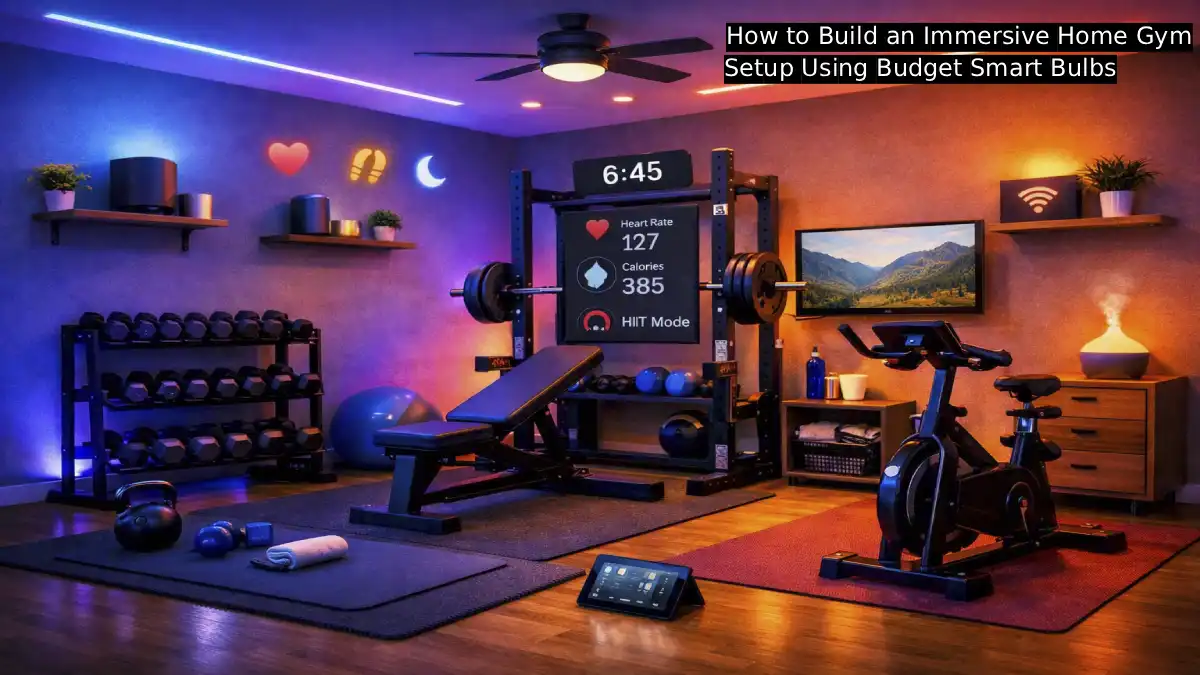
Walk into any boutique fitness studio and you’ll notice something beyond the equipment: the lighting is doing real work. Deep reds and oranges during a high-energy class, cool blues during a cooldown, pulsing color synced to the music’s beat — that atmosphere is a deliberate design choice, and it genuinely affects motivation and workout intensity. What most people don’t realize is that recreating that exact experience at home costs remarkably little, thanks to a wave of genuinely capable budget smart bulbs that hit the market in the last couple of years.
This is the full build guide: which budget smart bulbs actually deliver real color and brightness, how to set up workout-specific lighting scenes, and how to put together a genuinely immersive home gym corner for well under $100.
Jump Links
- Why Lighting Actually Matters for a Home Gym
- How Smart Bulbs Actually Work: The Basics
- Best Budget Smart Bulbs for a Home Gym
- Budget Bulb Comparison Table
- The Full Setup: Step by Step
- Workout-Specific Lighting Scenes
- Adding Music Sync for Cardio and HIIT
- Total Cost Breakdown
- Bulbs vs. LED Strips: Which Should You Use
- Voice Control and Automation Setup
- Common Setup Mistakes to Avoid
- FAQ
- The Bottom Line
Why Lighting Actually Matters for a Home Gym
It’s tempting to treat lighting as a purely cosmetic upgrade, but it’s genuinely functional in a home gym context. Smart lighting transforms a workout space into a more energizing environment, and features like customizable colors, brightness adjustment, and scene modes are specifically noted for helping boost motivation during training sessions. That’s not just marketing language — the same reasoning behind why boutique fitness studios invest heavily in lighting design applies just as much to a converted garage or spare bedroom gym.
Beyond motivation, lighting genuinely affects safety and functionality too. Bright, energizing light during a strength or cardio session helps with visibility and alertness, while a dimmer, cooler-toned scene during stretching or a cooldown period supports a calmer, more recovery-focused mental state. A single set of smart bulbs, properly configured, can shift between both of these needs instantly, something a static overhead fixture simply can’t do.
How Smart Bulbs Actually Work: The Basics
Before diving into specific products, it helps to understand the three main ways smart bulbs connect to your home network, since this affects both setup difficulty and long-term reliability. Wi-Fi bulbs (including popular budget brands like Wyze and Govee) connect directly to your home router with no separate hub required, making them the simplest option to get started with. Zigbee bulbs (like Philips Hue) require a separate hub device for full functionality, but offer more reliable performance for larger installations spanning many bulbs across a whole home. Bluetooth Mesh bulbs pair directly to compatible smart speakers, which then act as the connection gateway, avoiding both a separate hub and additional Wi-Fi network congestion.
For a single-room home gym setup specifically, Wi-Fi bulbs are almost always the right call — they’re the easiest to set up, require no additional hardware purchase, and a handful of bulbs in one room won’t meaningfully strain a typical home Wi-Fi network the way a whole-house installation might.
Best Budget Smart Bulbs for a Home Gym
Wyze Bulb Color (~$8–$10 per bulb): Currently one of the most color-capable budget smart bulbs available, delivering 1100 lumens of brightness with 90+ CRI (a measure of color accuracy) and full RGB color plus tunable white output. At this price point, it’s widely regarded as offering the brightest color output per dollar of any competing budget bulb, making it a strong anchor choice for a home gym setup specifically needing genuinely vivid color.
Govee Smart Bulb (~$10 per bulb, often cheaper in a four-pack): Built specifically around scene modes and music sync, with the Govee Home app offering a strong library of dynamic lighting scenes and a real-time music reactive mode. For a home gym prioritizing an energizing, nightclub-adjacent atmosphere during cardio or HIIT sessions, Govee’s music-sync capability is one of the standout budget features on the market.
WiZ Connected Color (~$8 per bulb): A genuinely strong all-around value pick offering full color, tunable white, and Matter smart home compatibility, meaning it works across Alexa, Google Home, and Apple Home without being locked into a single ecosystem. A solid choice for anyone wanting broad smart home compatibility without paying a premium.
Govee RGB LED Strip Lights (~$25–$35 for a two-roll, 32.8-foot set): For a more immersive, wraparound lighting effect rather than single-point bulb lighting, these strips support millions of colors, music sync, and app or voice control, making them a popular choice specifically for garage and home gym setups looking for a more dramatic, all-encompassing lighting effect.
Budget Bulb Comparison Table
| Bulb | Approx. Price | Brightness | Color Accuracy (CRI) | Music Sync | Hub Required |
|---|---|---|---|---|---|
| Wyze Bulb Color | $8–$10 | 1100 lumens | 90+ | Limited | No |
| Govee Smart Bulb | $10 | Moderate–High | Good, prioritizes vibrancy over accuracy | Yes, strong | No |
| WiZ Connected Color | $8 | 800 lumens | Good | No | No |
| Govee RGB LED Strip (32.8ft set) | $25–$35 | High (strip coverage) | Good | Yes, strong | No |
The Full Setup: Step by Step
1. Decide on your primary light source: bulbs, strips, or both.
A single-room home gym generally benefits from 2 to 4 color-capable bulbs in existing fixtures, plus optionally a length of LED strip lighting along a wall, mirror frame, or ceiling edge for a more wraparound effect.
2. Purchase your bulbs and confirm your home Wi-Fi covers the space.
Since most budget smart bulbs run on 2.4GHz Wi-Fi specifically (not 5GHz), confirm your router broadcasts a 2.4GHz network and that your gym space gets a reliable signal before purchasing more bulbs than you need.
3. Install the app and connect each bulb.
Each brand has its own companion app (Wyze app, Govee Home, WiZ app), and setup typically takes just a couple of minutes per bulb: screw in the bulb, open the app, follow the pairing instructions, and connect to your Wi-Fi network.
4. Group your bulbs into a single room/zone.
Most apps allow you to group multiple bulbs together under one room name, letting you control brightness, color, and scenes for the entire space simultaneously rather than adjusting each bulb individually.
5. Link to a voice assistant (optional but recommended).
Connecting to Alexa or Google Assistant allows hands-free control mid-workout — genuinely useful when your hands are full of dumbbells or you’re mid-set and don’t want to reach for a phone.
6. Build your workout-specific scenes.
Using the app’s scene or automation features, save a few preset lighting combinations tailored to different workout types (see the next section for specific suggestions), so switching between them takes one tap or a single voice command.
7. Test brightness and placement before committing to a full setup.
Live with your initial bulb placement for a few workouts before adding more, since it’s often easier to identify what’s genuinely enhancing your space versus what feels like overkill once you’re actually training under the lighting.
Workout-Specific Lighting Scenes
- HIIT/Cardio — Energizing Red-Orange: A vivid, warm red-orange scene at full brightness mimics the high-energy atmosphere of a boutique cardio class, and pairs especially well with a music-sync mode during interval training.
- Strength Training — Bright White or Cool Blue: Bright, neutral or slightly cool-toned lighting supports visibility and focus for lifting sessions where form and safety matter most.
- Yoga/Stretching/Cooldown — Soft Purple or Warm Amber: A dimmer, warmer scene supports a calmer mental state appropriate for cooldown, stretching, or restorative sessions.
- Dance Cardio/Group-Style Workouts — Music-Synced Multicolor: A dynamic, music-reactive scene cycling through multiple colors in time with your playlist recreates that boutique studio, nightclub-adjacent energy that makes cardio feel less like a chore.
- Early Morning Sessions — Bright Cool White: A bright, daylight-toned scene (5000K–6500K) helps combat morning grogginess and mimics natural daylight, useful for anyone training before sunrise.
- Late Evening Sessions — Warmer, Dimmer Tones: For anyone training close to bedtime, a warmer, moderately dimmed scene avoids the overstimulating brightness that can interfere with winding down afterward.
Adding Music Sync for Cardio and HIIT
This is genuinely one of the most immersive upgrades available at a budget price point. Music sync features, most notably strong in Govee’s lineup, allow lighting to react in real time to the beat and rhythm of whatever’s playing, creating a dynamic, pulsing effect that closely mimics a live studio class atmosphere. For high-energy cardio or HIIT sessions specifically, this feature genuinely elevates the experience compared to a static color scene, since the lighting becomes an active, responsive part of the workout rather than passive background ambiance.
To use it effectively: position your phone or speaker near the bulbs’ built-in microphone sensor (or connect via the app, depending on the specific bulb’s music-sync method), select a high-energy sensitivity setting for fast-tempo music, and test with a couple of songs before your actual workout to fine-tune responsiveness.
Total Cost Breakdown
| Item | Quantity | Estimated Cost |
|---|---|---|
| Wyze Bulb Color or Govee Smart Bulb | 3–4 bulbs | $30–$40 |
| Govee RGB LED Strip (optional, for wraparound effect) | 1 set | $25–$35 |
| Existing lamp/fixture reuse | $0 | Using fixtures you already own |
| Total (bulbs only) | $30–$40 | |
| Total (bulbs + LED strip) | $55–$75 |
Even the fuller setup, combining bulbs and an LED strip, stays comfortably under $100 total — a small fraction of what a professional studio-style lighting installation would cost, while delivering a genuinely comparable atmospheric effect in a single home gym room.
Bulbs vs. LED Strips: Which Should You Use
Both have a place in an immersive home gym setup, and combining them tends to produce the best overall effect.
- Bulbs work best in existing overhead fixtures, lamps, or sconces, providing the primary room illumination while still offering full color and scene control.
- LED strips work best for accent lighting — along a mirror frame, behind equipment, or tracing the edge of a ceiling — creating a wraparound glow effect that bulbs alone can’t replicate, since strips provide continuous, directional light along a surface rather than a single point source.
For a genuinely “immersive” feel specifically, pairing a few color bulbs for general room lighting with a length of LED strip for accent lighting creates noticeably more depth and atmosphere than either option alone.
Voice Control and Automation Setup
Once your bulbs are grouped and your scenes are saved, voice control becomes genuinely useful mid-workout. A few practical automation ideas worth setting up:
- “Start Workout” voice command or routine: Configure a single voice command (through Alexa or Google Assistant routines) that simultaneously switches to your preferred workout scene and, if compatible, starts your workout playlist.
- Time-based automation: Automatically shift to a brighter, cooler-toned scene during early morning hours and a warmer, dimmer scene in the evening, without needing to manually adjust each session.
- “Cooldown” scene trigger: A second voice command or scheduled automation that transitions from an energizing workout scene into a calmer stretching/cooldown scene partway through a longer session.
Common Setup Mistakes to Avoid
- Buying bulbs before checking your router’s Wi-Fi band. Most budget smart bulbs require 2.4GHz Wi-Fi specifically; confirm your router broadcasts this band (many modern routers do, but some require manually enabling a separate 2.4GHz network).
- Overloading a single Wi-Fi network with too many bulbs at once. Adding 10 or more Wi-Fi-connected smart bulbs to a budget router can strain network performance; a single-room gym setup with 3–6 bulbs is well within normal limits for most routers.
- Skipping the CRI (color rendering index) spec. For color-heavy scenes and vivid effects, this matters less, but if you also want the space to double as a well-lit, functional room, checking for at least 80+ CRI avoids a washed-out or artificially tinted look under white-light settings.
- Not testing scenes before committing to a full setup. Live with a smaller initial bulb purchase for a week or two of actual workouts before expanding, since preferences around brightness and color intensity vary significantly once you’re actually training under the lighting.
- Forgetting to check hub requirements before buying. Confirm a bulb is genuinely hub-free (most budget Wi-Fi bulbs are) before purchasing, to avoid an unexpected additional cost for a required bridge device.
📌 YOU MIGHT ALSO LIKE:
The ‘Facebook Marketplace’ Tech Guide: 5 Red Flags to Watch for When Buying Used Gear
FAQ
Do I need a smart home hub to set up smart bulbs in my home gym?
For most budget Wi-Fi bulbs, including Wyze, Govee, and WiZ, no hub is required — they connect directly to your home Wi-Fi network. Zigbee-based systems like Philips Hue do require a separate hub, which is worth factoring into your budget if you’re considering that brand specifically.
Can smart bulbs really sync to my workout music?
Yes, several budget brands, most notably Govee, offer genuine real-time music-sync features, where lighting color and intensity respond dynamically to whatever’s playing, creating an energizing, studio-like effect during cardio or HIIT sessions.
How many smart bulbs do I actually need for a home gym?
For most single-room home gym setups, 3 to 4 color-capable bulbs in existing fixtures provide solid coverage and scene versatility, with an optional LED strip adding accent lighting for a more immersive, wraparound effect.
Will smart bulbs work with my existing gym lighting fixtures?
In most cases yes, as long as the fixture uses a standard bulb socket (typically E26/E27) and can handle the bulb’s wattage equivalent, smart bulbs simply screw in like a standard bulb, requiring no rewiring or fixture replacement.
Is it worth spending more on premium brands like Philips Hue instead of budget options?
For most home gym setups specifically, budget options deliver roughly 90% of the premium experience at 30–60% of the cost, according to smart home comparison testing. Premium brands offer somewhat better long-term reliability and broader ecosystem integration, but for a single-room workout space, budget bulbs are generally a strong value choice.
Do these bulbs work with Alexa or Google Assistant for hands-free control during a workout?
Yes, most budget smart bulbs, including Wyze, Govee, and WiZ, offer compatibility with both Alexa and Google Assistant, allowing hands-free scene switching during a workout without needing to touch your phone.
The Bottom Line
An immersive, motivating home gym atmosphere doesn’t require a professional studio-style lighting installation or a premium smart home budget. A handful of genuinely capable budget smart bulbs — Wyze, Govee, or WiZ, running $8 to $10 each — combined with a few well-chosen workout-specific scenes, can transform a plain corner of your home into a space that actually feels energizing to train in, all for well under $100 total.
For more budget-friendly wellness and home setup guides, check out more posts over at The Frugal Glow.
Sources: