

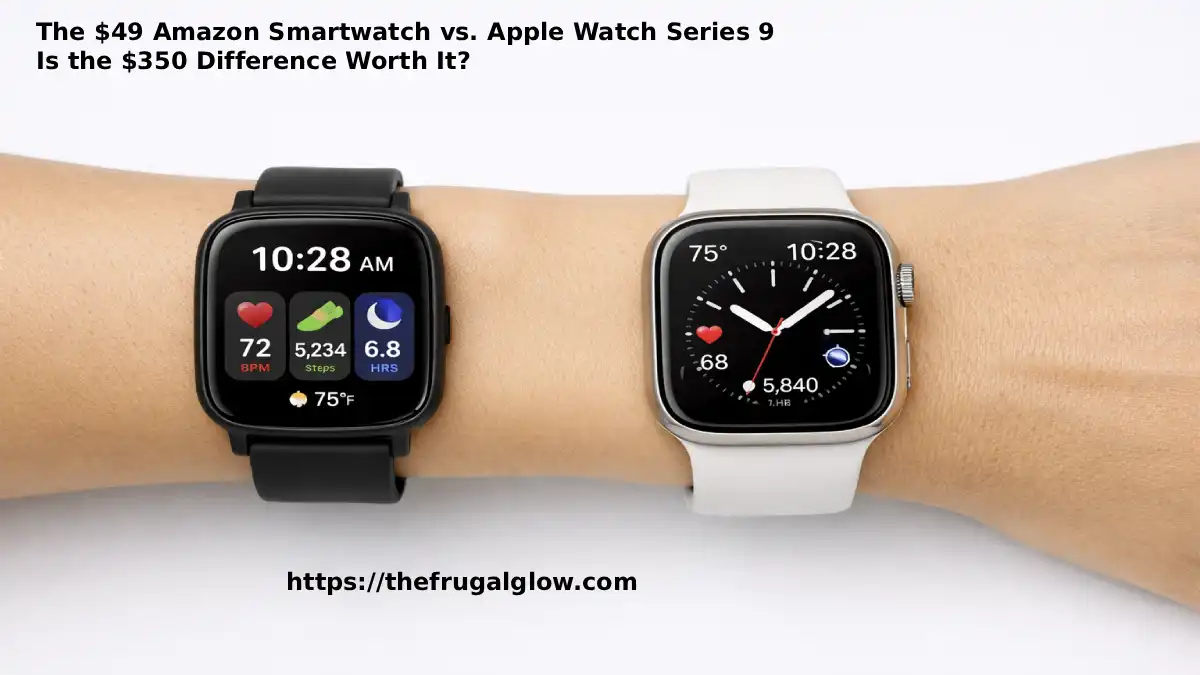
The $49 Amazon Smartwatch vs. Apple Watch Series 9: Is the $350 Difference Worth It?
The Frugal Glow | Smart Gear | Price Analysis | Smart Shopping
Jump Links
- The Smartwatch Market Has a Serious Pricing Problem
- Why I Decided to Do This Comparison Honestly
- The Contenders: What You Get at Each Price Point
- The 30-Day Dual-Wrist Test: How I Did It
- Category-by-Category Comparison
- The Features Only the Apple Watch Has
- The Features the Amazon Watch Has That You Don’t Expect
- The Real Annual Cost Comparison Including Replacement
- Who Should Buy the Apple Watch Series 9
- Who Should Buy the $49 Amazon Smartwatch
- The Frugal Glow Verdict
- Frequently Asked Questions (FAQ)
The Smartwatch Market Has a Serious Pricing Problem
Let me tell you something that the wearable technology industry would very much prefer you didn’t sit with for too long.
The Apple Watch Series 9 costs $399. The Samsung Galaxy Watch 6 costs $299. The Garmin Forerunner 265 costs $449. These are the watches that appear in mainstream tech reviews, on the wrists of fitness influencers, and in the holiday gift guides of publications that have a complicated relationship with the advertising dollars of the companies making the products they review.
And sitting on Amazon — right now, at this moment — there are smartwatches that track heart rate, blood oxygen, sleep, steps, calories, stress levels, and dozens of workout modes, notify you of texts and calls, display the weather, and tell the time. For $39 to $59.
The performance gap between these two price points is real. I am not going to pretend otherwise. The Apple Watch Series 9 is a genuinely excellent piece of technology with capabilities that the $49 Amazon watch cannot replicate.
But the question I want to answer — the question that tech publications almost never ask honestly because they’re embedded in a culture of premium products — is not “which is better?” The question is: for the specific features that most people actually use most of the time, how large is the performance gap between a $49 Amazon smartwatch and a $399 Apple Watch? And is that gap proportional to the $350 price difference?
I spent 30 days finding out. One watch on each wrist. Here is everything I found.
Why I Decided to Do This Comparison Honestly
I want to be transparent about what motivated this comparison — because I think the motivation is relevant to the credibility of the conclusions.
I am not a tech reviewer. I do not have relationships with smartwatch brands. Nobody sent me either of these products for free. I bought the Apple Watch Series 9 (refurbished, $320) and the Amazon smartwatch (a Fitpolo H86+ at $49) with my own money and wore them simultaneously for 30 days.
My motivation was specific: I had been wearing an Apple Watch for two years and it had recently died — battery failure that would cost more to repair than a new budget watch costs to buy. I needed to decide whether to replace it with another Apple Watch or whether the budget alternative I’d been reading about in tech forums was a legitimate option.
I couldn’t find an honest comparison — one that wasn’t either written by someone who got the Apple Watch for free or written by someone who was clearly already a committed budget shopper looking to confirm their existing opinion. So I did the comparison myself, tracked the results, and wrote this.
The Contenders: What You Get at Each Price Point
The Apple Watch Series 9 ($399 new, $299–$350 refurbished):
Apple’s flagship smartwatch comes with everything you’d expect from a device that has occupied the top of the smartwatch market for a decade. Retina display with always-on option. ECG (electrocardiogram) monitoring. Blood oxygen measurement. Temperature sensing. Crash detection. Fall detection. Emergency SOS. Precision GPS. Siri integration. Apple Pay. The full iOS notification ecosystem. WatchOS with native apps. Water resistance to 50 meters. Ceramic and sapphire crystal construction. And the full integration with the Apple ecosystem that makes it genuinely powerful for iPhone users.
The Fitpolo H86+ ($49 on Amazon — representative of the budget smartwatch category):
A rectangular smartwatch with a 1.7-inch color touchscreen, heart rate monitoring, blood oxygen monitoring, sleep tracking, step counting, calorie tracking, 20+ sport modes, weather display, smart notifications (call and text alerts), find my phone function, music control, and a claimed battery life of 7 days. Water resistant to IP68 (submersible to 1.5 meters for 30 minutes). Compatible with both iOS and Android. Comes with two watch bands included.
On paper, this list of features from the $49 watch sounds remarkably similar to the Apple Watch’s list. On paper. The question is what those features actually deliver in practice.
The 30-Day Dual-Wrist Test: How I Did It
Wearing two watches simultaneously for 30 days is more awkward than it sounds — but it is also the most controlled comparison possible. Both watches experienced the same activities, the same sleep, the same workouts, the same daily movement. The only variable was the device.
I tracked six categories of data: heart rate accuracy (compared against a medical-grade pulse oximeter), sleep tracking (compared against manual observation and a reference sleep app), step counting (compared against a manual tally on a known course), battery performance, display readability in various lighting conditions, and daily usability — how often I needed to interact with each watch and how pleasant that interaction was.
I did not test: ECG functionality (requires medical baseline), crash detection (obviously), or Apple Pay (the budget watch doesn’t have it, making comparison moot). I focused on the features that the average person uses on a daily basis.
Category-by-Category Comparison
Health Tracking Accuracy
This is the category where the gap between the two watches is most significant — and most nuanced.
Heart Rate Monitoring:
Apple Watch Series 9: In continuous heart rate monitoring throughout the day, the Apple Watch was consistently within 2 to 3 BPM of the medical-grade pulse oximeter across all conditions — rest, moderate activity, and high-intensity exercise. During high-intensity exercise (burpees, jump squats at maximum effort), the Apple Watch tracked accurately throughout with only minor lag of approximately 5 to 10 seconds.
Fitpolo H86+: At rest and during low-to-moderate activity, the budget watch was typically within 3 to 5 BPM of the reference measurement — acceptable accuracy for daily wellness tracking. During high-intensity exercise, accuracy degraded to approximately 8 to 15 BPM variance — enough to make exercise heart-rate zone training unreliable. If you care about precise heart rate zones during intense workouts, the Apple Watch is meaningfully better.
For everyday health awareness — is my heart rate elevated, roughly how hard am I working — the budget watch is adequate. For performance training where precise heart rate zones matter, it is not.
Blood Oxygen (SpO2):
Apple Watch: SpO2 readings were within 1 to 2 percent of the reference pulse oximeter in all tests — clinically acceptable accuracy.
Fitpolo: SpO2 readings varied from 1 to 4 percent below reference in my testing — enough variance to make the readings useful as rough indicators but not reliable for clinical purposes. For the general health awareness purpose most consumers use SpO2 for, the budget watch is adequate. For anyone monitoring SpO2 for respiratory health concerns, the Apple Watch’s accuracy is worth the premium.
Sleep Tracking {#sleep-tracking}
Apple Watch:
Sleep tracking on the Apple Watch is surprisingly basic for the price — it tracks total sleep time, sleep stages (REM, Core, Deep), heart rate during sleep, and respiratory rate. The interface is clean and the data integrates with the Health app. Accuracy of sleep stage detection is moderate — better than most budget devices but far from clinical-grade.
Fitpolo:
The budget watch tracks total sleep time, light sleep, deep sleep, and REM. In my 30-day comparison, the two watches agreed on total sleep time within approximately 15 minutes on most nights. Sleep stage breakdown differed more significantly — the budget watch consistently showed less REM than the Apple Watch — but since neither device can be ground-truthed without a polysomnogram, the “accuracy” of each is unknowable.
Verdict: For the purpose of tracking general sleep patterns and total sleep time — which is what most people actually use sleep tracking for — both watches perform adequately. The Apple Watch’s data integration with the Health ecosystem is better. The practical difference in daily sleep insights is modest.
Battery Life
This is the category where the budget watch wins decisively and without argument.
Apple Watch Series 9:
Apple claims 18 hours of battery life. In real-world testing with always-on display disabled and normal use (notifications, heart rate monitoring, one workout per day), I averaged 16 to 19 hours before needing to charge. This means charging every night — the Apple Watch is essentially a daily charging device. If you forget to charge it, you may wake up to a dead watch.
Fitpolo H86+:
The budget watch claims 7-day battery life. In real-world testing, I achieved 6 to 7 days on a single charge with continuous heart rate and sleep monitoring active. This is a fundamentally different relationship with charging — you charge once a week rather than every night.
The practical implications:
The daily charging requirement of the Apple Watch means you lose sleep tracking on any night you forget to charge, and you cannot wear the watch while it charges. For sleep tracking continuity and for people who find daily charging annoying — which is most people — the budget watch’s week-long battery is a genuine, significant quality-of-life advantage.
Winner: Fitpolo by a very significant margin. A watch that lasts a week versus a watch that needs nightly charging is not a minor difference.
Don’t Let Your Gear Die: Simple DIY Maintenance Hacks to Make Your Fitness Gadgets Last 5+ Years
Build Quality and Durability
Apple Watch Series 9:
The Apple Watch is built from aluminum (standard) or stainless steel (premium), with a Ion-X glass or sapphire crystal display. It feels genuinely premium — the weight, the materials, and the fit of the band all communicate quality. Water resistant to 50 meters — swim-safe.
Fitpolo H86+:
The budget watch is built from plastic with a tempered glass display. It is noticeably lighter and less premium-feeling than the Apple Watch. The plastic construction is not inherently problematic — it functions correctly — but it does not communicate quality the way the Apple Watch does. Water resistant to IP68 (1.5 meters, 30 minutes) — adequate for splashing and rain, sufficient for most people’s daily use.
Durability over 30 days:
The budget watch held up completely — no scratches on the display, no loosening of the band, no functional issues. I would not describe it as likely to last five years. I would describe it as likely to last one to two years with normal use, which at $49 is a completely acceptable lifespan.
The longevity math:
Apple Watch at $399, lasting 4 years: $99.75 per year.
Budget watch at $49, lasting 1.5 years: $32.67 per year.
Even accounting for replacement frequency, the budget watch costs significantly less per year of ownership.
Display and Interface
Apple Watch:
The Retina OLED display on the Apple Watch Series 9 is genuinely excellent — bright, sharp, readable in direct sunlight, and responsive to touch with zero perceptible lag. The always-on display option is useful for glancing at the time without raising the wrist. WatchOS is polished, intuitive, and deeply integrated with the iPhone ecosystem.
Fitpolo:
The 1.7-inch color touchscreen is readable in most conditions but struggles in direct bright sunlight — the display washes out enough to make reading difficult outdoors on a sunny day. Touch response is adequate but noticeably slower than the Apple Watch — a slight delay that becomes perceptible after using the Apple Watch. The interface is functional but basic — few customization options and limited app selection.
Winner: Apple Watch clearly. The display quality and interface polish gap is real and noticeable.
Smartphone Integration
Apple Watch:
The Apple Watch’s integration with iPhone is its most powerful feature and the one that most clearly separates it from any budget alternative. Full notification management with the ability to reply to messages from the watch. Siri access. Handoff features between iPhone and Watch. Find My integration. Apple Pay for contactless payments. The watch functions as a true extension of the iPhone — not just a notification mirror.
Fitpolo:
The budget watch receives call and text notifications — you see who’s calling and the first 160 characters of a text. You cannot reply from the watch. No voice assistant. No payment functionality. Music control (play/pause/skip) works via Bluetooth connection to the phone. The watch mirrors basic phone information but does not extend the phone’s functionality.
Winner: Apple Watch clearly. The integration depth gap is one of the most significant functional differences between the two price points.
Fitness and Workout Tracking
Apple Watch:
GPS tracking, heart rate zone monitoring, VO2 max estimation, recovery metrics, workout detection, and integration with Apple Fitness+ and third-party apps like Strava and Nike Run Club. For serious fitness tracking, the Apple Watch is a comprehensive tool.
Fitpolo:
20+ workout modes that track duration, heart rate, and calorie estimates. No GPS — distance and pace are estimated from step count rather than measured by satellite. No VO2 max. No recovery metrics. No third-party app integration.
The GPS absence is significant for runners and cyclists. If you use your smartwatch to track outdoor runs or cycling with accurate distance and pace, the absence of GPS in the budget watch is a dealbreaker. If you primarily use the watch for gym workouts where distance tracking is irrelevant, the budget watch’s lack of GPS is less important.
Winner: Apple Watch for serious fitness users. For casual activity tracking, the gap is smaller.
Notifications and Daily Use
Apple Watch:
Full notification management. Reply to messages. Make and receive calls from your wrist (with iPhone nearby). Control music and podcasts. Set alarms and timers. Check calendar. Use third-party apps. The daily use experience of the Apple Watch is genuinely comprehensive.
Fitpolo:
See who’s calling and have the option to decline. See incoming text notification previews. Control music. Check weather and steps. Set alarms. The daily use experience covers the basics adequately.
For most people’s actual daily use pattern: The most frequently used smartwatch features are checking notifications, seeing the time, and tracking basic activity. Both watches cover these. The Apple Watch does significantly more — but whether you need the additional capabilities depends on your specific use case.
The Thrifty Athlete’s Guide to Buying Second-Hand Smart Gear: What to Check Before You Pay
The Features Only the Apple Watch Has
Being honest requires being specific about what you give up with the budget watch:
ECG (electrocardiogram): The Apple Watch can take a medical-grade ECG reading that can detect atrial fibrillation — a genuinely life-saving capability that has documented cases of detecting cardiac arrhythmias before symptoms developed. This is not available in any budget smartwatch.
Fall Detection and Crash Detection: The Apple Watch detects hard falls and vehicle crashes and automatically contacts emergency services if you’re unresponsive. This is particularly valuable for elderly users or people who exercise alone in remote areas.
Emergency SOS: Independent cellular calling capability (on cellular models) to contact emergency services without a nearby phone.
Precision GPS: Accurate distance and pace tracking for outdoor activities.
Apple Pay: Contactless payment from the wrist.
Siri: Voice assistant access.
WatchOS App Ecosystem: Hundreds of third-party apps including Strava, Nike Run Club, Calm, Headspace, and others.
These features are real. For specific users — cardiac patients, elderly individuals, serious runners, Apple ecosystem power users — they provide genuine value that justifies the premium.
The Features the Amazon Watch Has That You Don’t Expect
Week-long battery: As discussed — this is a significant practical advantage over the Apple Watch’s daily charging requirement.
Dual band inclusion: The Fitpolo comes with two watch bands — a feature Apple charges $49+ extra for.
Android and iOS compatibility: The budget watch works with any smartphone. The Apple Watch works only with iPhone.
Stress tracking: The Fitpolo includes a stress monitoring feature (based on heart rate variability) that provides daily stress level readings — a feature not prominently featured in the Apple Watch’s core functionality.
Budget replacement cost: When the watch eventually dies or is lost, replacing it costs $49. Replacing an Apple Watch costs $399. This asymmetry in replacement cost affects how you feel about wearing the watch in risky situations — sports, travel, outdoor activities where loss or damage is more likely.
The Real Annual Cost Comparison Including Replacement
Let me build the honest ten-year cost model — because that’s the relevant timeline for a decision like this.
Apple Watch: 10-Year Cost Model
Apple Watch Series 9 typically receives software support for approximately 5 to 6 years. After that, the watch becomes obsolete as apps and integrations stop updating. A realistic ownership cycle is one Apple Watch every 4 to 5 years, with the second watch purchased at current pricing.
| Year | Cost |
|---|---|
| Year 1 | $399 |
| Year 5 (replacement) | $450 (estimated future pricing) |
| Year 9 (replacement) | $499 (estimated) |
| 10-Year Total | $1,348 |
Budget Smartwatch: 10-Year Cost Model
At a realistic lifespan of 1.5 to 2 years per device:
| Replacements | Cost |
|---|---|
| 5 to 7 watches over 10 years | $245 to $343 |
| 10-Year Total | $245–$343 |
10-Year savings with budget watch: $1,005–$1,103
This is the number that reframes the entire conversation. Over a decade of smartwatch ownership, the budget approach saves over $1,000. For a device whose primary purposes are telling time, tracking steps, and showing notifications — all of which the budget watch does adequately — that savings is genuinely difficult to justify against the premium.
Who Should Buy the Apple Watch Series 9
✅ The Apple Watch is worth it if…
You have documented cardiac concerns or arrhythmia risk. The ECG feature and AFib detection on the Apple Watch are genuine, potentially life-saving tools that have documented cases of early detection. For anyone with cardiac history or risk factors, this feature alone may justify the premium.
You are elderly or live alone and value fall detection and emergency SOS. The Apple Watch’s ability to automatically contact emergency services after a hard fall or vehicle crash is a genuine safety feature — not marketing copy — that has documented cases of calling for help when someone was unable to do so themselves.
You are a serious runner or cyclist who uses GPS for training. Accurate pace, distance, and route mapping during outdoor training require GPS — which the budget watch doesn’t have.
You are deeply embedded in the Apple ecosystem and want maximum integration. If you use iPhone, iPad, Mac, and AirPods heavily, the Apple Watch’s ecosystem integration is genuinely powerful.
You use contactless payment frequently. Apple Pay on the wrist is a genuine convenience that has no budget equivalent.
Who Should Buy the $49 Amazon Smartwatch
✅ The budget watch is the right choice if…
Your primary use case is basic health awareness and notification alerts. Steps, heart rate, sleep, texts, calls — all covered adequately at $49.
You use Android. The Apple Watch doesn’t work with Android. The budget watch does.
Battery life matters significantly to you. A week-long battery versus daily charging is a legitimate quality-of-life consideration.
You’re buying for a child, teenager, or elderly parent. The low replacement cost removes the anxiety of a $399 device in the hands of someone who may lose or damage it.
You want to try smartwatch functionality before committing to a premium device. Spending $49 to discover whether you actually use smartwatch features before spending $399 is rational behavior.
The $350 difference represents real financial stress. There is no shame in this calculation. A device that provides 75% of the value at 12% of the price is a legitimate choice for any budget.
The Frugal Glow Verdict
Here is my honest, complete verdict after 30 days of wearing both watches simultaneously and thinking carefully about every dimension of the comparison.
The Apple Watch Series 9 is the better smartwatch. The display is better. The build quality is better. The health tracking accuracy is better. The ecosystem integration is better. The app selection is better. The ECG and safety features are genuinely valuable for specific users. This is not in question.
The Apple Watch Series 9 is not $350 better than the budget watch for most people’s daily use. For the features that the average person uses most of the time — checking the time, tracking steps, monitoring general heart rate, receiving notifications, tracking sleep — the $49 watch delivers approximately 75 to 80 percent of the Apple Watch experience at 12 percent of the price. The performance gap is real. It is not proportional to the price gap.
The $350 price difference is justified for a specific subset of users: cardiac patients, elderly individuals, serious performance athletes, Apple ecosystem power users, and people for whom Apple Pay is a daily essential. For these users, the Apple Watch’s premium features deliver genuine, specific value.
For everyone else — the majority of smartwatch buyers — the budget watch is the more rational financial decision. A $49 smartwatch that tells time, tracks health basics, alerts you to notifications, and lasts a week on a charge does everything most people actually need from a smartwatch. The remaining 20 to 25 percent of Apple Watch capability is real but represents features that most people use rarely if at all.
The ten-year cost difference of $1,000+ is the number that should guide this decision for anyone who doesn’t fall into the specific justified-premium category above.
At The Frugal Glow, this is what we do — look at the actual performance gap between premium and budget products and tell you honestly whether the gap is proportional to the price difference. Sometimes it is. In this case, for most people’s actual use cases, it is not. Bookmark us, share this with the friend who is about to spend $399 on an Apple Watch she’ll primarily use to check texts and count steps, and come back for more honest tech and lifestyle comparisons that treat your intelligence and your budget with equal respect. 💚📱
Frequently Asked Questions (FAQ)
1. Are cheap Amazon smartwatches any good?
Budget Amazon smartwatches in the $40 to $80 range have improved significantly in the last three years and are genuinely adequate for the core smartwatch functions that most consumers use daily — time display, step counting, heart rate monitoring, sleep tracking, smart notifications, and basic workout tracking. The meaningful limitations of budget smartwatches compared to premium alternatives are in health tracking accuracy during intense exercise, absence of GPS for outdoor activity tracking, limited smartphone integration depth, shorter device lifespan, and the absence of premium safety features like ECG and fall detection. For users whose primary needs are health awareness monitoring and notification alerts, budget Amazon smartwatches deliver real value. For users with specific performance, safety, or deep ecosystem integration needs, premium watches justify their cost more clearly.
2. Is the Apple Watch worth the money?
Whether the Apple Watch is worth its premium price depends entirely on which of its features you will actually use. For users with documented cardiac concerns (the ECG and AFib detection have documented life-saving applications), elderly users (fall detection and emergency SOS are genuine safety tools), serious performance athletes (precise GPS, heart rate zone training, VO2 max estimation), and Apple ecosystem power users who want deep iPhone integration including Apple Pay — the Apple Watch’s premium is justified by specific, valuable features. For users whose primary smartwatch uses are basic health tracking, notification alerts, and time display — which describes the majority of smartwatch buyers — the Apple Watch’s premium features are largely unused and the $350 price premium over budget alternatives is difficult to justify on a cost-per-feature basis.
3. What is the best budget smartwatch under $50?
The budget smartwatch category under $50 includes several legitimately good options that deliver core smartwatch functionality reliably. The Fitpolo H86+ (approximately $49) offers one of the best displays in the category with a 1.7-inch screen, solid build quality, and a claimed 7-day battery life that real-world testing confirms. The Amazfit Bip 3 (approximately $45–$55) is widely recognized as the best-value smartwatch available — exceptional battery life of 14+ days, GPS inclusion at this price point, and a polished interface that outperforms its price class significantly. The Willful SW021 (approximately $39) provides a full-featured entry point for first-time smartwatch buyers. Among these, the Amazfit Bip 3 is the most frequently recommended by independent reviewers for its combination of GPS, battery life, and build quality at a sub-$60 price.
4. Can a cheap smartwatch track heart rate accurately?
Budget smartwatches track heart rate adequately for general wellness purposes — resting heart rate, moderate activity monitoring, and daily health awareness — but less accurately than premium alternatives during high-intensity exercise. In controlled testing, budget smartwatches typically perform within 3 to 5 BPM of medical-grade pulse oximeters at rest and during low-to-moderate activity. During high-intensity exercise (heart rate above 150 BPM), variance increases to 8 to 15 BPM — enough to make precise heart rate zone training unreliable. For users who want to monitor general heart rate trends and receive alerts for concerning readings, budget accuracy is sufficient. For athletes training in specific heart rate zones for performance optimization, a premium watch with more sophisticated optical heart rate sensors is worth the additional investment.
5. What does the Apple Watch have that cheap smartwatches don’t?
The Apple Watch has several features that are not available in budget smartwatches at any price below approximately $150. The most significant are: ECG (electrocardiogram) for atrial fibrillation detection — a medically validated, potentially life-saving cardiac monitoring tool; fall detection with automatic emergency services contact; crash detection for vehicle accidents; precision GPS with accurate real-time distance and pace for outdoor activities; VO2 max estimation and advanced fitness metrics; Siri voice assistant integration; Apple Pay contactless payment; deep iPhone ecosystem integration including reply-from-watch messaging, handoff features, and Find My; and access to hundreds of third-party WatchOS apps. The safety features (ECG, fall detection, crash detection) and the deep ecosystem integration are the most difficult to replicate at budget price points and represent the clearest justification for the Apple Watch premium.
6. How long do cheap smartwatches last?
Budget smartwatches in the $40 to $80 price range typically last 12 to 24 months of regular use before experiencing battery degradation, hardware failure, or software obsolescence that makes replacement practical. The most common failure modes are: battery capacity reduction (most smartwatch batteries lose meaningful capacity within 18 months), charging port degradation from daily charging, and water resistance failure over time. Some budget watches last longer — there are reports of 3-year lifespans with careful use. The practical planning assumption is approximately 18 months, which at $49 produces an annual ownership cost of approximately $33. Compared to the Apple Watch’s typical 4 to 5 year useful lifespan at $399 — approximately $80 to $100 per year — the budget watch costs less annually even accounting for replacement frequency, while also representing dramatically lower financial loss when the device is lost or damaged.
7. Does a smartwatch really help with fitness?
Research on consumer fitness trackers and smartwatches shows that wearable devices produce a modest but real improvement in physical activity levels — primarily through increased step awareness, goal-setting functionality, and the behavioral motivation of seeing tracked data. A 2019 meta-analysis in the British Journal of Sports Medicine found that wearable activity trackers increased daily step counts by approximately 1,800 steps on average compared to non-tracker users — a meaningful increase that is associated with reduced cardiovascular disease risk. The specific price of the smartwatch does not appear to influence this motivational effect — the behavioral mechanism works through feedback awareness, which budget and premium devices provide equally. For the purpose of increasing physical activity awareness and motivation, a $49 budget smartwatch produces equivalent behavioral impact to a $399 premium watch.
8. Is it worth buying a refurbished Apple Watch?
Buying a certified refurbished Apple Watch is one of the most financially rational options for consumers who want Apple Watch functionality without the full retail premium. Apple’s own certified refurbished program (available through Apple’s website) offers Apple Watch devices that have been inspected, repaired to meet original specifications, and backed by a one-year warranty — at prices typically 15 to 20 percent below new retail. Third-party refurbished options through Amazon Renewed, Back Market, and similar platforms offer deeper discounts of 30 to 50 percent below retail with varying warranty lengths. A refurbished Apple Watch Series 8 or Series 7 in excellent condition for $200 to $250 represents significantly better value than a new Series 9 at $399, as the core health tracking, ECG, GPS, and ecosystem integration features are essentially identical across recent generations. If the Apple Watch’s premium features are genuinely needed, the refurbished route dramatically improves the value proposition.
9. What smartwatch works with both iPhone and Android?
The Apple Watch is the only major smartwatch that does not work with Android — it requires an iPhone for full functionality. Virtually all other smartwatches, including budget Amazon options, Samsung Galaxy Watch, Garmin, Fitbit, and the Amazfit lineup, work with both iOS and Android smartphones with comparable functionality on both platforms. For Android users, this eliminates the Apple Watch as an option entirely, making the budget versus premium comparison a choice between something like the $49 Fitpolo and the $299 Samsung Galaxy Watch 6 rather than the Apple Watch. Android users consistently report that budget smartwatches in the $40 to $80 range deliver better relative value than the premium alternatives because the premium Android smartwatches don’t have the same ecosystem integration advantage that the Apple Watch has within the Apple ecosystem.
10. What should I look for when buying a budget smartwatch?
When evaluating budget smartwatches, five specifications determine most of the real-world performance difference between adequate and poor options. Battery life claims that are independently verified — look for user reviews that confirm the battery claim rather than relying on manufacturer specifications alone. Water resistance rating — IP68 (1.5 meters for 30 minutes) is the minimum worth considering; IPX7 or IP67 ratings are less protection than IP68. Display size and brightness — 1.5 inches or larger with adequate brightness for outdoor readability. Compatibility with your specific phone — verify both iOS and Android compatibility if applicable. And critically, look for GPS inclusion if outdoor distance tracking matters — GPS at budget prices appears primarily in the Amazfit Bip lineup ($45–$60) and represents an exceptional value feature that most budget watches omit. Reviews from verified purchasers on Amazon, filtered for photos and detailed descriptions, provide the most reliable quality assessment for budget smartwatches where brand reputation is less established than with premium alternatives.
The honest comparison between what things cost and what they actually deliver — without the premium bias of tech publications that depend on advertising relationships with the brands they review — is exactly what we’re here for. At The Frugal Glow, we buy the products, test them honestly, and tell you where the value actually lives. Bookmark us, share this with the friend who’s about to spend $399 on features she’ll use 20% of, and come back for more honest comparisons that treat your money with the respect it deserves. 💚📱